Changelog

Follow new updates and improvements to Memex.

Save LinkedIn Posts

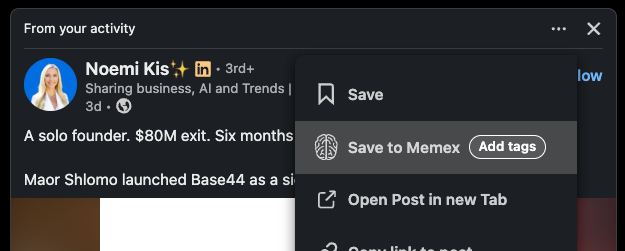
From any supported LinkedIn post, the three-dot menu now includes Save to Memex. Tags can be added during the save flow, so the post lands in the right part of the library immediately.

Saved LinkedIn posts are indexed deeply:

  • Memex extracts text from images in the post.

  • Memex makes image contents searchable.

  • Memex transcribes videos attached to the post.

That means search and Q&A work across the post text, image text/content, and video transcripts after the post is saved.

This is especially useful for research, content planning, competitive tracking, expert quote libraries, and any workflow where LinkedIn posts contain useful ideas that are easy to lose in the feed.

Try it from the three-dot menu on a LinkedIn post, then add a tag during save to keep research organized from the start.

Quality of Life improvements

We also added a shortcut to open the original LinkedIn post in a new tab, so you do not have to copy the link and paste it manually when you just want to view the full post.

Auto-Tagging library or incoming feeds

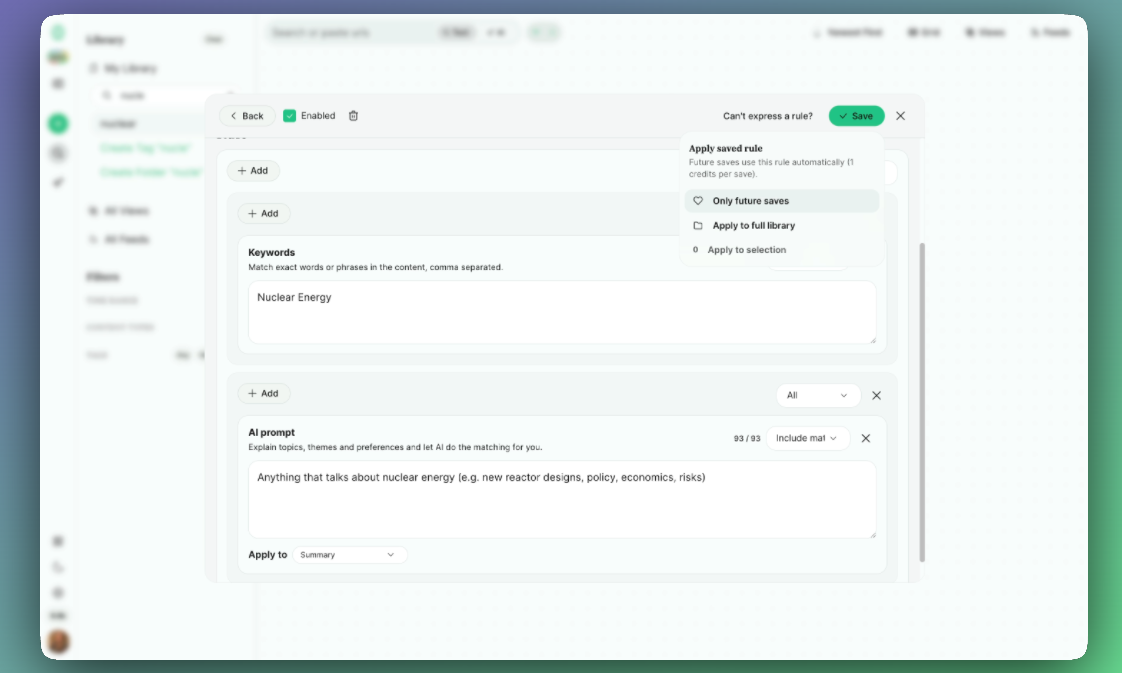
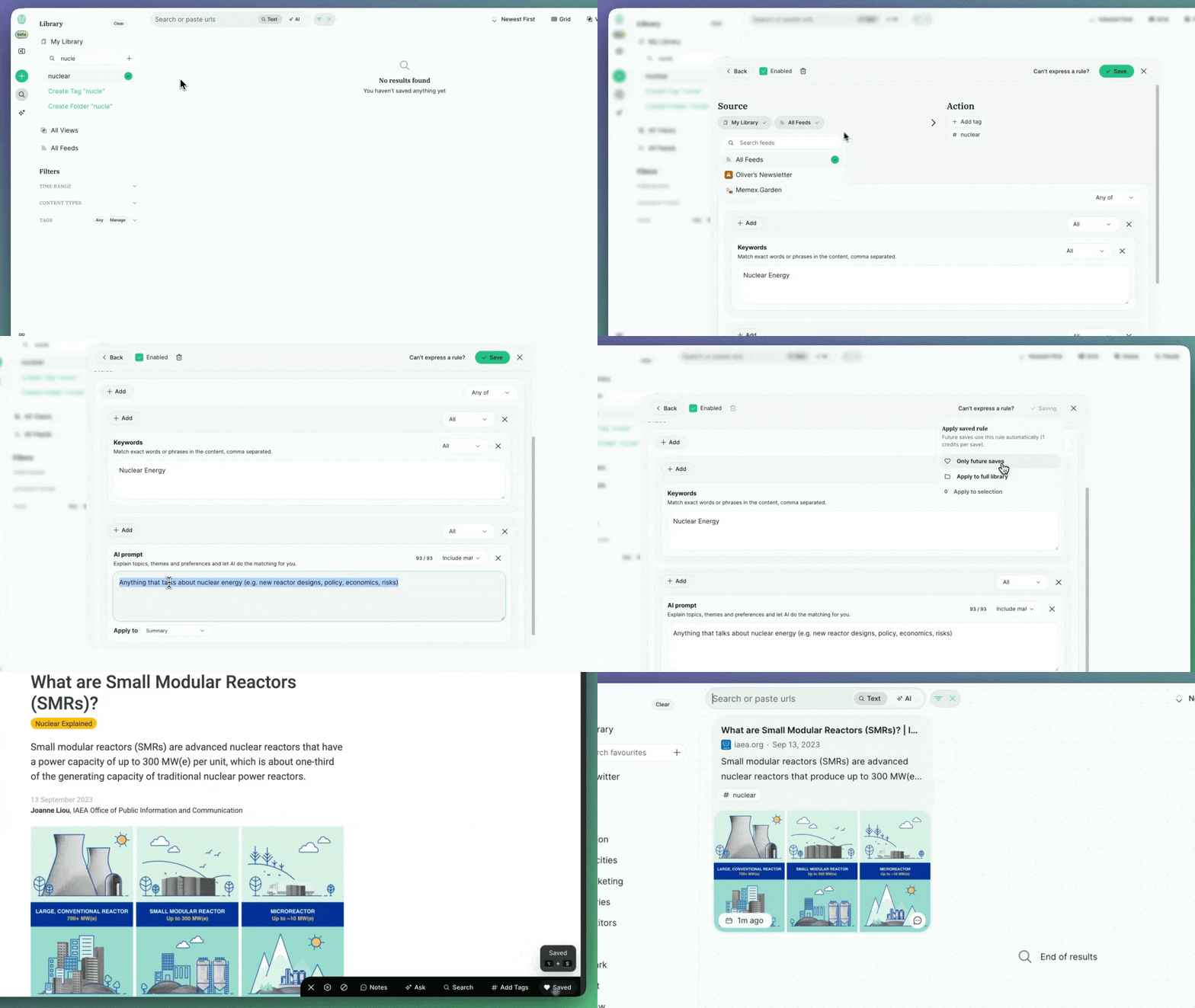
You can now create elaborate rules on how to tag content you save or that enters your feeds with keywords and AI prompts.

This means:

  • Less need for manually tagging stuff with high level of control and precision

  • A system for sorting incoming feed posts from your favourite Youtube channels, blogs, Substacks and Subreddits for the gems that really matter to you

    (feed support is functional but in pre-release state and can be toggled on in the settings > feature flags for beta users (reach out in the help chat to get upgraded). Appreciate any bug reports via the help chat)

Features

Auto-tagging by keywords, content type, [free]

Use keyword matching to auto-tag items.

Pricing: Free

Auto-tagging with LLM query [Pay as you go credits]

You can define custom prompts to take actions on a piece of content.

E.g. “Anything that talks about nuclear energy (e.g. new reactor designs, policy, economics, risks)”

Pricing:

  • Summary level: 1 credit per 500 total prompt characters (across all prompts) per piece of content

    • E.g. saving 100 pieces of content with a total of 1000 prompt characters: 200 credits

  • Deep level, full content analysis: Additional 1 credit per 1000 tokens of content (about 4000 characters)

    • E.g. saving or receiving 100 pieces with total of 4000 characters each and 1000 prompt characters: 200 + 200 = 400 credits

Backfill your library

When adding a new tag you can always choose to retroactively apply the tag to your your entire library. Anything already tagged with the tag will be skipped.

Easter eggs / previews

Over the past 1.5 months we have been shipping a bunch of stuff that i am about to write change logs for. So if you’re playing around you can already find some of them. Others will be fully available in a few day when I polished them up. (If you find bugs, please report via the help chat, i am actively hunting for them and fixing them up right away)

  • Mobile App to save, annotate, summarize & search

  • Summarizing X posts and videos from the timeline

  • Sharing Annotated pages

  • PDF annotation on mobile and desktop

  • @mentions on x to summarize/transcribe/translate

  • Sharing Views

  • Collaborative Views

  • Kindle import & sync

  • Readwise import & sync

  • RSS feeds: Follow, search and auto-tag incoming items

  • Importing YouTube channels

  • Importing everything from a page

  • Public Library so you can share publishable repositories of your work

Note to all Memex v1 users

If you’re just now coming back, Memex v2 is a completely new system. So sign up again, and if you had a lifetime plan prior, let me know via the help chat and I’ll upgrade you right away.

Either way, your existing data we will migrate over in the coming weeks, as our new data model stabilises (which we are almost there!)

Filtered Views (personal, shared, collaborative)

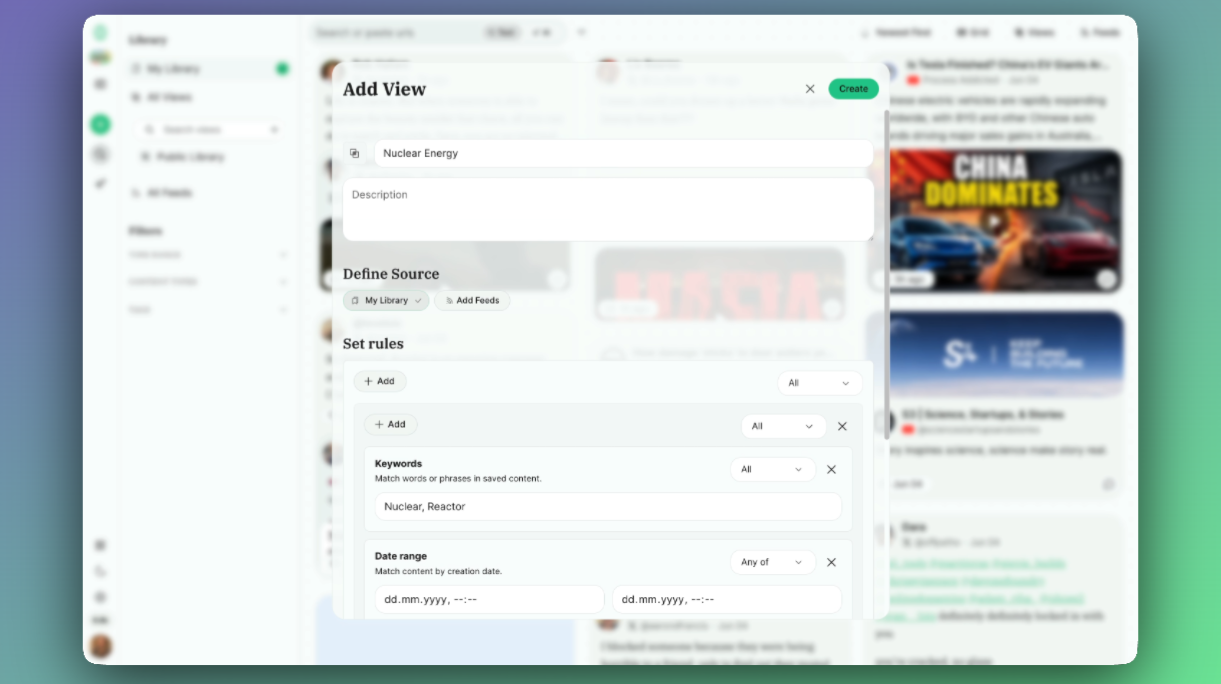
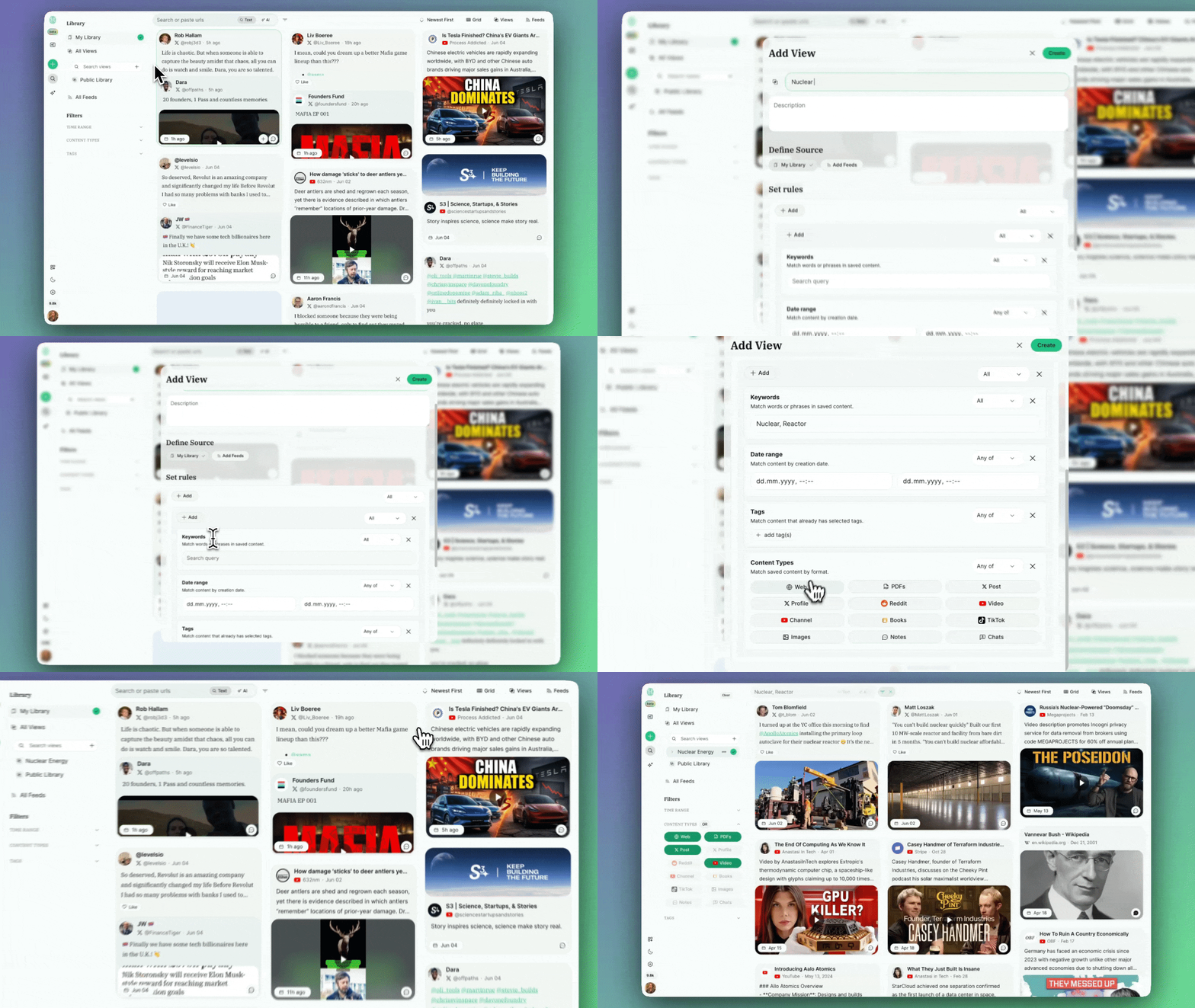
You can now create dynamic Views of things you saved. Say “in this view show me everything i tag with “#nuclear” or that has the terms “Nuclear” or “Reactor” in them” from the last 2 weeks.

This works across your own library or RSS feeds you follow.
The latter behind feature flag, settings > feature flags.

[Please report bugs via the help chat - they’ll be fixed within hours]

Features

Complex filter condition

You can create conditions for:

  • Keywords

  • Date Range

  • Tags

  • Content Types

And logic gates for nested:

  • All

  • Any

  • Not Any

  • Not All

Sharing Views

You can share views with other people and they can search & ask question on the filter scope you set. This makes it a low-friction way to share your reading list, research and notes.

This is already live but behind an early tester feature flag (settings > feature flags). A full change log for this will come soon.

Collaborative views

You can even collaborate on views with other people. If you invite someone to collaborate on a view and the accept that invitation, the same filter conditions will apply to their library and you have shared access to the conditions on that filter across multiple libraries.

This is already live but behind an early tester feature flag (settings > feature flags). A full change log for this will come soon.

Easter eggs / previews

Over the past 1.5 months we have been shipping a bunch of stuff that i am about to write change logs for. So if you’re playing around you can already find some of them. Others will be fully available in a few day when I polished them up. (If you find bugs, please report via the help chat, i am actively hunting for them and fixing them up right away)

  • Auto-Tagging saves & feeds

  • Mobile App to save, annotate, summarize & search

  • Summarizing X posts and videos from the timeline

  • Sharing Annotated pages

  • PDF annotation on mobile and desktop

  • @mentions on x to summarize/transcribe/translate

  • Sharing Views

  • Collaborative Views

  • Kindle import & sync

  • Readwise import & sync

  • RSS feeds: Follow, search and auto-tag incoming items

  • Importing YouTube channels

  • Importing everything from a page

  • Public Library so you can share publishable repositories of your work

Note to all Memex v1 users

If you’re just now coming back, Memex v2 is a completely new system. So sign up again, and if you had a lifetime plan prior, let me know via the help chat and I’ll upgrade you right away.

Either way, your existing data we will migrate over in the coming weeks, as our new data model stabilises (which we are almost there!)

~ Oliver
Earlier updates