Tried it. Same issue. Will check back on Friday! Thank you.
Oliver Sauter
Team•
Oct 4, 2023
Ok, I think I found the issue. At least seems very likely. So since I have an M2 mac where it uses as the default architecture seemingly the arm64 which is compatible with my machine (on parallels) but not with others.
I've now uploaded new packages to the Github repo with that new target architecture support. Let's hope it works.
[Deleted User]
•
Oct 6, 2023
It works! And it's working great. I'm impressed by how instant the sync is.
I need to get used to not editing these notes but I actually really like that they're tagged with spaces. I think it will help me go back into Memex for related notes, maybe do some new annotations which will then sync them without bringing over ALL of the things saved in Memex at once.
Thinking about the future, I think it would be good to be able to say "Notes in x space will not sync" or otherwise be able to designate what syncs automatically and what doesn't.
Comments9
Oliver Sauter
Sep 28, 2023
Heard this now a second time, but got it working on my machine fine.
What was the file you downloaded, bc the exe in the release seems to be working?
Oliver Sauter
Sep 28, 2023
Updated the exe once more in the repo. https://github.com/WorldBrain/memex-local-sync/releases/tag/v0.0.3
I am not a Windows user so maybe i am missing something. I just ran the exe on my virtual machine and it worked.
[Deleted User]
Sep 28, 2023
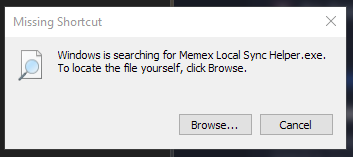
I downloaded the .exe and when I click it I get the message above.
The notes say to just put it in the programs folder but when it comes to windows, which programs folder?
Oliver Sauter
Sep 30, 2023
I just started it from the desktop, it ran through the installer and then connected.
Re the programs folder it was actually meant as only on Mac/Linux - but I realised/fixed that there was unclarity in the change log.
Oliver Sauter
Sep 30, 2023
If you like we can hop on a 15min fixing/bug hunting session?
https://calendly.com/worldbrain/15min
Oliver Sauter
Oct 4, 2023
I just uploaded a new version with a different build command. Not sure if it works but you can try - will attempt more thorough fix tomorrow: https://github.com/WorldBrain/memex-local-sync/releases/tag/v0.0.3
Anonymous User
Oct 4, 2023
Tried it. Same issue. Will check back on Friday! Thank you.
Oliver Sauter
Oct 4, 2023
Ok, I think I found the issue. At least seems very likely.
So since I have an M2 mac where it uses as the default architecture seemingly the arm64 which is compatible with my machine (on parallels) but not with others.
I've now uploaded new packages to the Github repo with that new target architecture support.
Let's hope it works.
[Deleted User]
Oct 6, 2023
It works! And it's working great. I'm impressed by how instant the sync is.
I need to get used to not editing these notes but I actually really like that they're tagged with spaces. I think it will help me go back into Memex for related notes, maybe do some new annotations which will then sync them without bringing over ALL of the things saved in Memex at once.
Thinking about the future, I think it would be good to be able to say "Notes in x space will not sync" or otherwise be able to designate what syncs automatically and what doesn't.